Showing posts with label precision. Show all posts

Saturday, May 22, 2010

Interpolation wars

15 days after the release, one issue in the packaging and some glitches on linkicc. Still no big bugs. At least the reported  ones are not such big to need a 2.1 release... yet.

Little CMS releases have been historically dropped each 6 months, so 2.1 should come on October-November more or less. I have a talk on the ICC DevCon on November, so it would be nice to have 2.1 released to at that time.

Otherwise the git is alive and I'm periodically committing  fixes to it. If you are using Little CMS code and don't have dependencies on linux distributions, I would recommend to use git code if possible.

One of those small glitches found is a weird error that was reported by a HP folk days ago. He was seeing
small differences on a CMYK profile when upgrading from 1.19 to 2.0

So, after investigation, I found the reason of those differences: Tetrahedral interpolation being used in 2.0 and Trilinear interpolation in 1.19. Tetrahedral was patented time ago, but now the patent has expired.

In fact, I did see such issue many years ago. On LUT elements being indexed by Lab colorspace, Tetrahedral does not work well. I suspect that's because Luma is uncentered (L is on one axis)
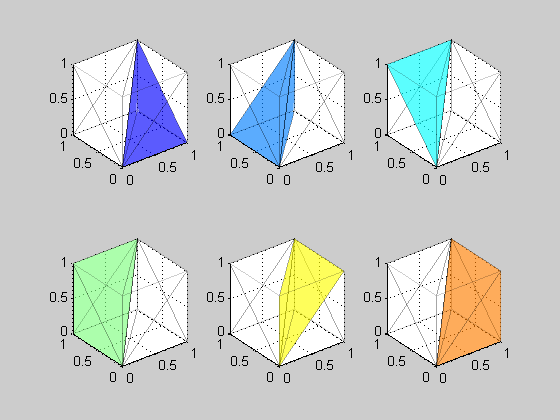
First thing to discard was a code bug. So I tried Max Derhak's SampleICC. To my astonishment, SampleICC is also using trilinear by default. Tried to modify Max code to do the interpolation as tetrahedral and... bingo! the same "bad" results as Little CMS. Up to four decimals. So here we go, the "bug" is in the interpolation algorithm. I checked PhotoShop CS4. It seems to be also using trilinear as well.

Now I have committed those changes to git. Note however, that your are not going to notice any difference but in very few profiles, and even in this case, maximum difference is about 2-3 digital counts (0.5 dE)

Saturday, September 19, 2009

Unbounded CMM

With the drop I'm posting right now (September 19) most of the utilities are now working. You have a tifficc applier, a transicc calculator and a linkicc devicelink generator. As you can see, some names have changed. This is because icclink was clashing with Graeme Gill's icclink from Argyll. This latter is an outstanding utility, and many users may want to have both installed, so I changed the name and get an extra consistency bonus (now all lcms utility names are "whatever-icc")
Now you have transicc (former icctrans) and therefore you can check one of the new features of lcms2. That's what is called "unbounded CMM mode"

What is that? Well, with lcms2 you can use floating point values. That means,  you are no longer limited to 0..255 on 8 bits or 0...65535 on 16 bits, but on some profiles you can get out of those bounds and the CMM still works.

Not all profiles does accept that. You need profiles that are implemented using enterly math expressions. Some very simple profiles works in such way, for example AdobeRGB. The sRGB profile does not work because it has curves implemented as tables, but the built-in sRGB does work as instead of tables it uses parametric curves. Also some advanced profiles for digital cameras using multiprocessing elements may work in unbounded mode. Right now it is hard to find any of those, as they are described in an addendum to the ICC spec.

Let's check this feature. Using AdobeRGB to the built-in  Lab in transicc:

C:\lcms-2.0\bin>transicc -i AdobeRGB1998.icc -o *Lab
LittleCMS ColorSpace conversion calculator - 4.0 [LittleCMS 2.00]
Enter values, 'q' to quit

R? 10
G? 10
B? 10
L*=0.7287 a*=0.0000 b*=-0.0000

Nothing special, but let's try this one

R? 300
G? 300
B? 300

L*=114.6770 a*=0.0006 b*=-0.0005

Do you see where I'm going? 300 is above 8 bits, and L*=114.6 is a highlight, so here you have an example of what can be accomplised with this mode.

Saturday, August 1, 2009

Sleep your bugs

It hurts. Its a sort of burning... when you figure out where is the bug, you experience an urgent necessity of fixing it, NOW! Big mistake.

It is not clear if was Knuth or Hoare who coined the phrase:

We should forget about small efficiencies, say about 97% of the time: premature optimization is the root of all evil.


It is indeed very true. I would like to add a humble corollary:

premature bugfixing is lame too.


So, here is my advice: Sleep your bugs.

I am not talking about typos. You know, misspelling 'l' and '1' for example (nobody should use 'le0' as var name, '1e0' is still a valid number) or failing to include a range check (last time I forget to place an 'if' I got a Pwnie nomination)

I am talking about logic bugs. Something wrong with the algorithm or the true logic of the program. Adding inconsistent features is another example.

Sleep those kind of bugs. Take good note of them, and wait a day or two in fixing. Probably you will find a neat way to deal with the issue without changing those hundreds of lines. Maybe not, but even in this case the solution is worth of the wait.

In my case the bug was black point detection. lcms2 is now an unbounded CMM that operates on floats. So the black point detection code was using floating point to do the calculations. Yep, it seems a nice feature: far more precision, etc. On the other hand, inks on floating point are represented as %, so the effective range is 0..100%, that is how Photoshop and others do work and I thought it makes sense to keep the feature in lcms2 as well.

Put both features together and you have a nice logic bug: extra code is needed on BP detection to deal with different ranges.

If you happen to be a professional programmer, you surely realize that my advice of postpone bug fixing goes against the schedule, the program manager and the planner. Sure, but that's lcms2, my pet project which has unlimited resources on time. Would be a dream for a commercial project, but this project is not commercial and therefore is not subjected to schedule tyranny.

By the way, a new drop of lcms2 is in the way and will be available in a day or two.

Monday, July 27, 2009

Less is more

If you have devoted some time to review the new API, maybe you have discovered an odd thing: there are some functions missing. Ok, you can blame me for remove *that* function doing exactly what you need. Of course that may be my mistake. But please consider perhaps I have good reasons to do that.

Let's take one example:

cmsReadICCMatrixRGB2XYZ(LPMAT3 r, cmsHPROFILE hProfile);

This function no longer exists in lcms 2.0 API.

Well, many people were using this function to retrieve primaries of a profile. So, for example, if you want to know which are the AdobeRGB primaries, just call the function with the right profile and here you go.

Seems easy, and useful, but trust me, it is not. The real reason d'ĂȘtre of this function is somehow surprising. Not because it is handy but because is precise. Please consider this piece of pseudo-code:

cmsXYZTRIPLE Result;
hXYZ = cmsCreateXYZProfile()
xform = cmsCreateTransform(hProfile, TYPE_RGB_DBL, hXYZ, TYPE_XYZ_DBL, INTENT_RELATIVE_COLRIMETRIC, 0)
cmsDoTransform(xform, {{ 1, 0, 0}, {0, 1, 0}, {0,0,1}}, &Result, 3)

Do you follow it? I create a transform from the profile (in RGB) to XYZ. Then I convert max of R, and B to XYZ. I am obtaining the primaries! Despite it seems more complex, this method is much better because is guaranteed to work in *any* profile, not only on matrix-shaper ones.

So, what is the point of having the old function? Easy: lcms 1.x was precission-limited to 16 bits, so you cannot obtain primaries with enough precision with the method described above. But that does not apply with lcms2, where you have an outstanding 64-bit double precission. Less is more in this particular case!